Run one county list to a documented decision in 30 days.
You finish with a pre-send packet ready for an attorney, or a written stop memo naming the gate that failed. Both finishes use released templates only.
SFS Foundation is $500 one time for 12 months in the private SFS Operator group on Skool, with a 14-day refund.
It's education only: no leads, no 1:1 coaching, and no promise of income. No legal advice: we are not a law firm.
Start free. Choose the structured path when you need it.
The Thursday office hours are a public call, free for everyone. SFS Foundation adds the Operator Kit, written feedback on every mission check, the members-only Operator Lab, private group support, and updates during your access period.
Free community and SFS Foundation: what each includes
- Shared office hours
- Free communityIncluded. Thursdays, 7–8 PM Eastern with Carl and Matt, on a public call.
- FoundationIncluded. The same public call.
- Operator Lab
- Free communityNot included
- FoundationMembers only. Tuesdays, 7:00–7:45 PM Eastern, 45 minutes, recorded for members.
- Starting point
- Free communityCommunity posts, templates and scripts
- FoundationThe Operator Kit and the written classroom
- Mission feedback
- Free communityNot included
- FoundationWritten feedback within 1 business day on every mission check you post
- Group support
- Free communityFree community discussion
- FoundationPrivate group; replies within 2 business days
- Published updates
- Free communityPublic community posts
- FoundationUpdates during your 12 months
- Price
- Free communityFree
- Foundation$500 one time for 12 months
Both are education. Neither includes leads, legal advice, done-for-you file review, or a promise of income.
What's in the Operator Kit
The kit is in the private classroom. These counts are for the kit as released to members.
- 172pages in the Operator Manual
- 43pages in the Business Mechanics companion
- 24templates
- 30field workflows
- 8mission checks
- 14worksheets
- 3AI prompt cards
- 4agent cards
- 1fictional practice case, with answer key
- 31state research cards
- 3document structures
- 1planner workbook
- 1AI agent starter kit
State research cards. 31 cards: 10 have a primary-source check and 21 are unverified leads. None is a legal certification.
Not in this version: the fee worksheet and four agreement drafts: fee agreement, partial assignment, attorney engagement, estate services.
The AI prompt cards, agent cards and starter kit are files you use yourself. We build and deploy nothing for you.
Your 30 days, week by week
8 mission checks across four weeks, tracked in one record: the 30-Day Operator Pilot workflow (FW30). Mission 0 comes first, on the day your access opens. Week 1 begins on your cohort's start Monday.
- Access dayStart with Mission 0
Mission 0 is the fictional practice case. It opens on the day you get access: read five source cards, fill in three forms and post a short summary. You get written feedback against the practice answer key within 1 business day.
Mission 0 and at least one Operator Lab fall inside the 14-day refund window.
- Week 1Market and sources
Choose one county and one sale type; for Cohort 1, choose a county in a checked state. Save the county's published list as your first source and record where it came from, its dates and what it cannot prove. Write down the rules question you cannot answer yet.
- Weekly record
- W01 Market + Source Layer
- Mission checks
- G01 Build Your Market
- Templates
- T01 Market Scorecard · T02 Source Register · T03 Rules Register · A90 Capability Inventory
- Workflows
- FW02 to FW04
- Week 2Lead engine, money and person
Take a small slice of your list and account for every row: retained, duplicate or unresolved. Record each money observation with its source, date and class, and keep identity, relationship, entitlement and authority as separate findings. Write what you do not know as UNKNOWN, with an owner and a next task.
- Weekly record
- W02 File + Evidence Layer
- Mission checks
- G02 Build Your Lead Engine
- G03 Verify The Money
- G04 Verify The Person
- Templates
- T04 Data Intake Map · T05 File Qualification · T06 Fund Status Note · T07 Evidence Packet Index · T11 Disposition Record · T08 Ownership Chain · T09 Interest / Lien Log · T10 Authority / Estate Check
- Workflows
- FW05 to FW12
- Week 3Decision, then connect and hand off
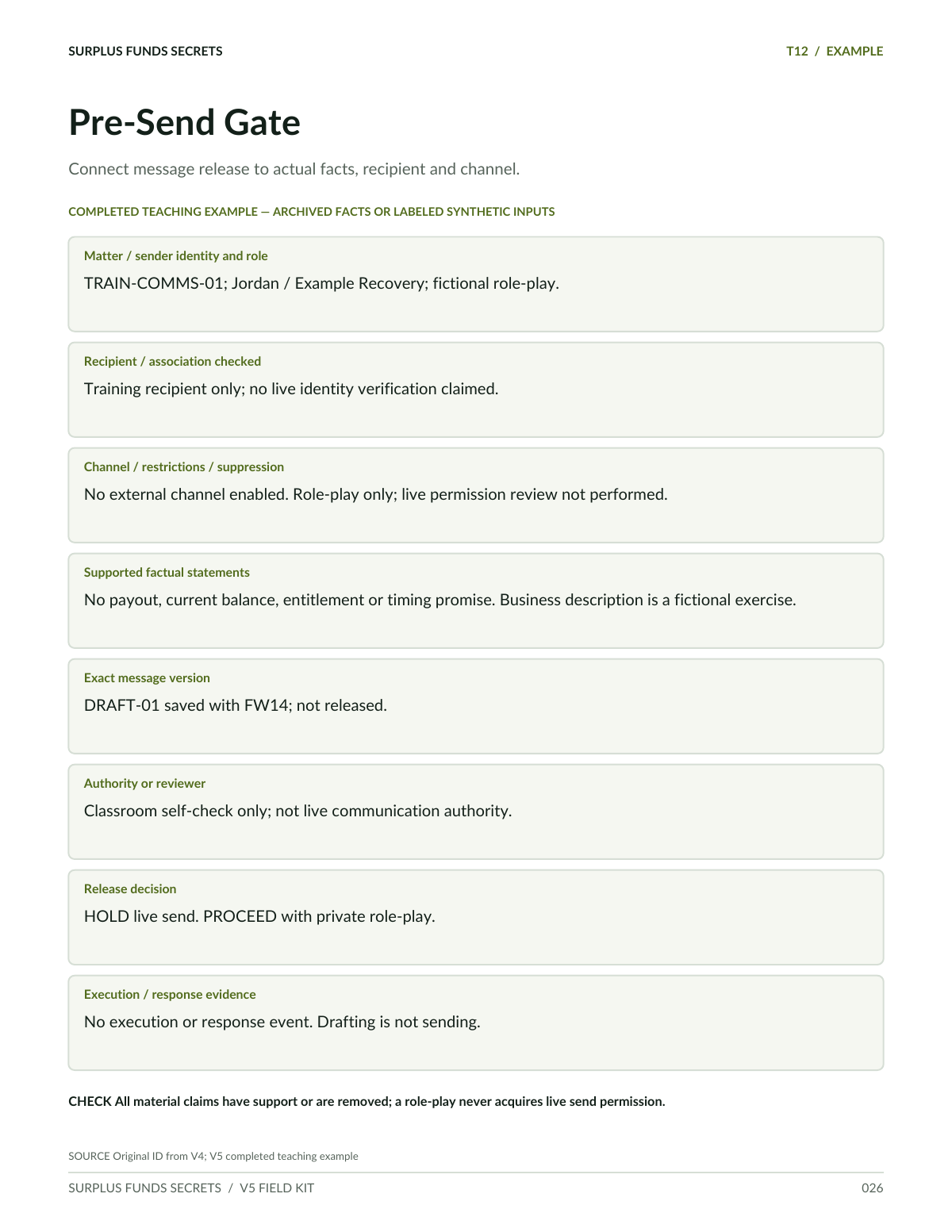
Write the decision for the exact action: PROCEED, HOLD or STOP. A STOP becomes the stop memo. If you PROCEED, practice the connect step without live sends, run the pre-send check, and build the handoff and its timing records. You send nothing.
- Weekly record
- W03 Connect + Handoff Layer
- Mission checks
- G05 Make The Decision
- G06 Connect The Claimant (only if your G05 decision is PROCEED)
- Templates
- T11 Disposition Record · T12 Pre-Send Gate · T13 Response Routing · T21 Approval Record · T14 Handoff Index · T15 Event Evidence Log · T16 Deadline Register · T17 Client Update Card
- Workflows
- FW13 to FW21
- Week 4Move the file, run the business, finish
Reconcile what the file shows: an event that has not happened stays unconfirmed. Set up the operating records, then run the capstone: give your folder to a fresh reader, or run a fresh-session self-audit, and record the method you actually used.
- Weekly record
- W04 Operating System Layer
- Mission checks
- G07 Move The File
- G08 Run The Business
Then the capstone: CAP01 Can Another Operator Take Over?
- Templates
- T18 Reconciliation · T19 CRM Stage Contract · T20 AI Task Card · T21 Approval Record · T22 Weekly Scorecard · T23 Role / Handoff Map · T24 Weekly File QA · A91 Owner Attention Queue
- Workflows
- FW22 to FW30
- FinishOne of two documentsA pre-send packet ready for an attorney
- T11 Disposition Record, reading PROCEED for one action: asking an attorney to review the packet
- T07 Evidence Packet Index
- T12 Pre-Send Gate
- T14 Handoff Index
- FW18 Prepare an Attorney Handoff Packet
A written stop memo naming the gate that failed- T11 Disposition Record, reading STOP for the exact action
- The mission check that failed, with the failed criterion marked HOLD
- FW13 Build Your Stop, Proceed, and Escalate Decision Tree
- N01 Continuation Sheet, only if the reason needs more room
Both finishes use released templates only. The course sends nothing. A stop is a valid finish: if a gate fails, you write the stop memo.
The 30 days are a pace, not a deadline. Your access lasts 12 months, so you can keep working a HOLD after day 30. Finishing is training: it is not a professional certification, and it is not approval to act on a live case.
See the work before you buy
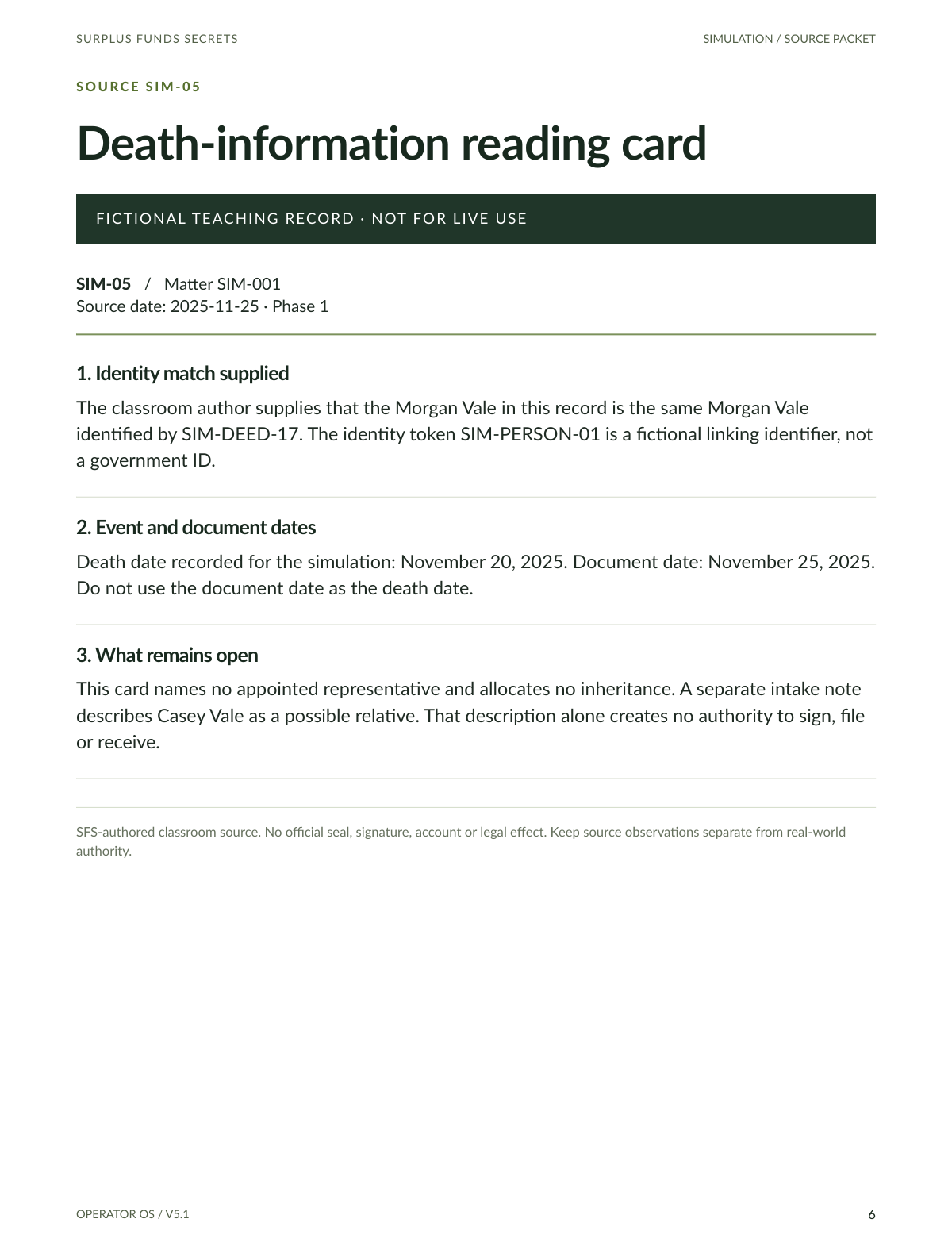
Two pages from the kit, filled with fictional inputs, and one example of the feedback a member gets.
Illustrative learning exercise
Fictional example; not a real claimant record or court form.
Adrian, our AI agent, replies within 1 business day. Members post the gate, the county and the decision. Names, phones, addresses and amounts stay out of the thread. A post that fails gets a request to repost it redacted, and no analysis. The rule also applies to anything a member says or shows in an Operator Lab.
Mission 0 (fictional practice case)
Gate: M0
County: Practice District (fictional)
Decision 1: reading the next supplied records: PROCEED. Reason: the five cards give enough to read on.
Decision 2: any conclusion about signing, a claimant's share or money received: HOLD. Reason: current custody is not shown.
Money: a historical figure from the sale accounting statement (SIM-02 section 2). Current held: UNKNOWN. Received: UNKNOWN.
People and authority: SIM-03 section 2 supports the owner of record's stated interest. SIM-04 section 2 is original principal only. SIM-05 sections 2 and 3 show a death. Who may act: established, because the death card and the intake note both point to family.
Still UNKNOWN: current custody, interest release
Next task: review the later custody source. Owner: me
Matches the answer key: you classed the money line as historical, with its source, and wrote current held and received as UNKNOWN. You read SIM-04 as original principal only. Missing: authority. SIM-05 section 3 says the death card names no appointed representative, and a note about a possible relative alone creates no authority to sign, file or receive. So "Who may act" is not established. Fix: change that line to "not established", cite SIM-05 section 3, and add authority to "Still UNKNOWN" with an owner. Next step: update your T11, then start week 1 when your cohort begins.
Proof, not promises
Surplus Funds Secrets is the education side of Full Circle Asset Recovery. Full Circle's pipeline has processed 148,000+ surplus-list rows from 511 counties in 35 states (October 2026).
Not included.
- No 1:1 coaching and no done-for-you file review.
- No leads or lead lists.
- No attorney access and no legal advice. We are not a law firm.
- No partnership or JV. Working a file with Full Circle is not part of the $500.
- No AI or software built for you, and no private integrations.
- No promise of income or results.
It's for people who want to learn how surplus-funds recovery works, step by step, and do the work themselves. It's not for anyone who wants leads handed to them, a done-for-you service, a partner to work their files, or quick money.
The only guarantee that exists here is the refund.
Pricing
No subscription. Full refund within 14 days of purchase, no questions asked. Renewal: $99 a year after the first 12 months, only if you choose it. Never charged automatically.
- 12 months in the private SFS Operator group
- The Operator Kit, in the private classroom
- Mission 0, the fictional practice case, on the day you get access
- Written feedback within 1 business day on every mission check you post
- The members-only Operator Lab: weekly, 45 minutes, recorded for members
- Thursday office hours, a public call that is free for everyone
- Community support in the group, with replies within 2 business days
- Published updates during the access period
By joining you agree to the SFS Foundation terms.
Join SFS Foundation — $500After you pay: we send an email invite, to the address you paid with, into the private SFS Operator group on Skool. You get access within 2 business days of payment. Checkout calls it “SFS Operator Community” (the private group it opens). Same product.
Help after you join: post in the group or email info@surplusfundssecrets.com. Replies come within 2 business days.
Cohorts and Founding Operators
Cohorts start on the first Monday of each month.
Cohort 1 starts Monday, November 2, 2026.
You can join any day. You get access within 2 business days of payment, and Mission 0 opens the day your access does. Week 1 begins on your cohort's start Monday. A cohort is a start date, not a purchase deadline.
The 14-day refund window counts from the day you buy, not from your cohort's start date.
Cohort 1 is steered to the 10 states with a primary-source check.
Founding Operators
The first 25 paid buyers are Founding Operators and keep the $99 renewal price for as long as they renew.
- The renewal is never automatic. You choose it, one year at a time.
- If you skip a year, the founding price ends.
- If we refund a purchase, that seat opens for the next buyer.
Staff do not count toward the 25 seats. The limit is 25 because of Lab capacity.
Questions, straight answers
Yes. Full refund within 14 days of purchase, no questions asked. Email info@surplusfundssecrets.com.
You can renew for $99 a year if you want to. Nothing renews or charges on its own.
Not as part of the $500. The $500 is the education. Working a file with Full Circle is invitation-only, case by case, under its own separate agreement. It is never promised when you buy.
No. Foundation teaches how to find and check lists yourself. Lead research is a separate Full Circle service.
We don't promise income or results. It's education. Real files move at the speed of courts and counties, and it varies file to file and state to state.
No. We are not a law firm and can't give legal advice.
Yes. Office hours are a public call: Thursdays, 7–8 PM Eastern with Carl and Matt (see the Skool calendar). Anyone can join. Foundation members also get the Operator Lab, a members-only call: Tuesdays, 7:00–7:45 PM Eastern, 45 minutes, recorded for members. Questions in the group get a reply within 2 business days. There is no 1:1 coaching.
Adrian, our AI agent, writes the feedback within 1 business day of every mission check you post in the group. Carl and Matt spot-check it, and hard cases go to the Operator Lab. For Mission 0, the reply checks your post against the practice answer key. For real files, it checks completeness against the criteria of the mission check you posted. It never contains a legal conclusion.
Members post the gate, the county and the decision. Names, phones, addresses and amounts stay out of the thread. A post that fails gets a request to repost it redacted, and no analysis. The rule also applies to anything a member says or shows in an Operator Lab.
That is a finish, not a failure. You write the stop memo naming the gate that failed, on the same released templates. A stop counts as progress.
The lessons are written pages in Skool.
Depends on your state — some require licensing, registration, or an attorney to file. Verify with your state before you file anything.
No. The price is the price. Join because you've watched the work and want to do it properly.